


Easy Quran Mp3 Audio Offline
Muslim Worldapp
When I need a simple way to keep Quran recitation, prayer planning, and basic Islamic reference tools together, Easy Quran Mp3 Audio Offline is the kind of app I can understand immediately. It is an Events app from Muslim Worldapp, but in daily use it feels more like a compact religious companion than a general event planner. The focus is practical: listen to the Quran, check Salah timing, find the Qibla direction, and browse the 99 Names of Allah without moving between several unrelated apps.
The most useful part of that combination is not any single tool on its own. It is the handoff between them. I can begin with a short listening session, check the next prayer, and then use the Qibla compass when I am away from home. That makes the app especially suitable for someone who wants a lightweight routine rather than a large, highly customized Islamic platform.
It is free to install and marked for Everyone, which makes it easy to try without committing money first. The app has reached over 10 million installs and holds a 4.7 average from around 170 thousand ratings, so it clearly appeals to a broad audience. Still, popularity does not remove the need to check whether its workflow matches your habits. If you expect advanced study tools, extensive personalization, or a polished replacement for every specialist app, you may find its simpler approach limiting.
From an ordinary day to a complete Quran and prayer routine
Starting with the situation that matters
I find this app most useful when the starting condition is uncomplicated. Perhaps I am commuting, staying in a hotel, visiting family, or trying to build a more consistent Quran listening habit. In those moments, I do not necessarily want a large library, social features, or a complicated dashboard. I want to open one app and get to the relevant tool quickly.
The offline Quran audio is the strongest reason to begin here. A connection is not always dependable, especially during travel or in places where mobile coverage is weak. Preparing the listening material before leaving gives the app a different role from a normal streaming player. Instead of treating recitation as something dependent on a live connection, I can make it part of a repeatable routine: prepare once, then listen during a walk, on public transport, or in a quiet room.
Related News

Instagram Is No Longer a Photo App. It Is an Attention Engine

Microsoft Teams Mobile: When Collaboration Becomes Navigation

How the NFL App Adapts to Android and iOS Updates

Temu: Elevate Your Shopping Experience to Billionaire Status

Why Traffic Rider Works Best as a Precision Reflex Game

How Google’s Find Hub Transforms Everyday Searches
That preparation step is important. I would not wait until the exact moment of prayer or travel to discover that the audio I want is not ready for offline use. A better workflow is to open the Quran section while connected, arrange the material I expect to use, and test playback before heading out. This small habit prevents the most frustrating kind of failure: assuming an offline function will work without first preparing it.
The app’s store summary also points to Qibla, Salah timing, and the 99 Names of Allah, so I see it as a group of connected reference tools rather than only an audio player. Someone who already has a favorite Quran app but needs a compass may still appreciate that arrangement. Conversely, a user who only wants uninterrupted recitation may find the extra sections unnecessary.
A practical step-by-step flow
My suggested first session would be short and deliberate. I would open the audio area, choose the recitation material I want to use, and confirm that it plays properly. I would then explore the prayer timing section and check whether the displayed schedule makes sense for my location and current day. Finally, I would open the Qibla compass in a place where I can compare its direction with a trusted reference.
Gallery
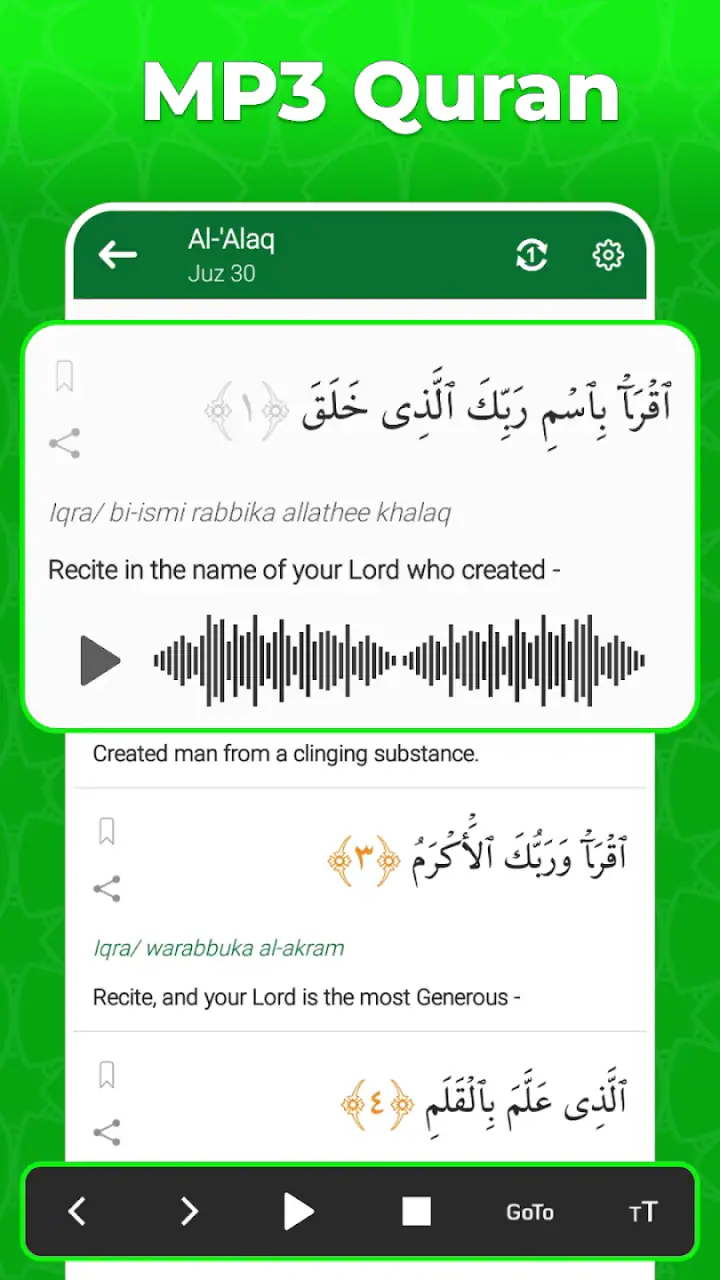
That last check is more valuable than it sounds. A compass depends on the phone’s orientation and surrounding interference, so waving the device around and accepting the first direction can create false confidence. I would hold the phone steadily, move away from obvious magnetic sources, and recalibrate if the device indicates that it needs attention. The app can be convenient, but it should be treated as a directional aid rather than an unquestionable instrument.
For prayer planning, I would use the timing screen as a daily prompt rather than assuming it removes all responsibility for checking local practice. Prayer times can be affected by calculation preferences, location accuracy, and regional conventions. If the times seem unusual, I would compare them with the timetable from my local mosque or another trusted source before relying on them. This is one of the app’s important trade-offs: convenience is high, but personal verification still matters.
The 99 Names of Allah section fits naturally into small gaps in the day. I might read a few names after listening, use it as a quiet reflection prompt, or browse it when I want a brief activity that does not require a long study session. It is particularly helpful for users who want a gentle reminder tool rather than a full academic reference work. I would not mistake a compact in-app list for detailed commentary, linguistic analysis, or scholarly instruction.
A useful routine is to assign each section a different purpose. I can use offline audio for focused listening, Salah timing for planning, the compass for location changes, and the Names section for reflection. Keeping those roles separate prevents the app from becoming a screen I open without knowing what I intend to do. It also makes the experience feel less cluttered, even though several functions live together.
How the handoffs work between tools
The first handoff is from preparation to listening. I move from an internet-connected setup into an offline situation, so the real test is whether the audio remains useful after that transition. This is where the app has a meaningful advantage over a standard online player. I can plan a session before leaving home and avoid turning a weak signal into an interruption.
The second handoff is from listening to prayer planning. After a recitation session, checking Salah timing gives the experience a practical next step. I can see when the next prayer is approaching instead of treating the audio as an isolated activity. That connection is simple, but it is one reason I would choose this app over keeping a Quran player, prayer timetable, and compass in separate places.
The third handoff is from time to direction. If I am in a new location, I can move from the prayer schedule to the Qibla compass without searching for another application. This is particularly convenient in a hotel room or during a visit where I do not already know the layout. I would still check the physical environment and hold the phone carefully, because a compass is only as useful as the way it is handled.
The final handoff is from information to reflection. The 99 Names of Allah section gives me something brief to read after the more functional tasks are finished. It changes the app from a utility I open only when I need a direction or time into something I can revisit during a quieter moment. That is a subtle strength, although users looking for deep educational material will need a more specialized resource.
These handoffs also explain why the app works better as a routine than as a one-time download. Its value grows when the same sequence becomes familiar: prepare audio, listen, check the next prayer, confirm direction when necessary, and finish with a short reflective reading. I would not force every step into every session, but the structure is there when I need it.
What the finished result feels like
When the workflow goes well, I finish with three practical outcomes. I have Quran audio available for listening, a quick way to orient prayer planning around Salah times, and a portable Qibla reference for unfamiliar places. The Names section adds a quieter, more personal use case. None of these tools needs to dominate the experience, which is why the app feels approachable to me.
Consider a realistic travel day. Before leaving, I prepare the audio while connected to the internet. On the journey, I listen without depending on a stable signal. After arriving, I check the next prayer time, open the compass, and hold the phone steady to establish direction. Later, I read through the Names section for a few minutes. That entire sequence can happen in one app, with fewer interruptions than switching between separate utilities.
For a new user, the main result is reduced friction. Instead of remembering which app handles which task, I have one familiar place to start. For a regular user, the benefit is consistency. The app can support a repeatable daily pattern without requiring a complicated setup or a large amount of technical knowledge.
The free entry point helps with that. I can test whether the audio workflow, prayer display, compass behavior, and reading section fit my needs before considering any optional in-app purchases, which range from under one dollar to under eighteen dollars per item. I would not buy anything immediately. I would first use the free experience across several ordinary situations and decide whether an optional purchase solves a problem I actually have.
The app is also accessible from an operating-system perspective because it supports Android seven point zero and later. That makes it relevant to people using older compatible phones rather than only recent devices. In practical terms, though, the age of a phone can still affect compass responsiveness, audio handling, and general smoothness, so compatibility alone does not guarantee an identical experience on every handset.
Where the flow breaks down
The offline promise is useful, but it creates a preparation responsibility. If I forget to arrange the audio beforehand, the feature cannot magically solve a lack of connectivity at the moment I need it. This is not a reason to reject the app; it is simply the central trade-off of offline listening. I would build preparation into my routine instead of treating it as an emergency option.
Prayer timing is another point where I would avoid blind reliance. A displayed schedule is helpful for planning, but location and calculation choices matter. If the app’s result differs from the timetable followed by my local community, I would investigate the difference rather than assuming one screen is automatically correct. Users who need highly specific regional settings may prefer a dedicated prayer app with more visible control over calculation methods.
The compass can also break the flow if the phone is not calibrated or is being used near magnetic interference. A direction indicator looks authoritative, but it is still a sensor-based tool. I would use it carefully, confirm the device is stable, and avoid treating a quick glance as a precision measurement. This is especially important for travelers who may be tired and tempted to accept the first reading.
The combined design has a downside as well. A user who wants a full Quran study environment may miss deeper translation controls, detailed commentary, memorization progress, or advanced search. A user who wants only a beautifully minimal audio player may feel that prayer and reference sections add visual noise. In both cases, a specialist alternative could be better because it concentrates on one task instead of balancing four.
There is also a difference between convenience and authority. I would use the app for access, reminders, listening, and orientation, but I would not make it my only source for religious learning or local prayer guidance. The 99 Names section can support reflection, yet serious study calls for dependable educational material beyond a compact mobile feature.
Who should install it, and who should pass
I would recommend it to someone who wants a straightforward Islamic utility app with offline Quran audio at its center. It is a good fit for travelers, commuters, people with unreliable data connections, and beginners who prefer one familiar interface. It also suits users who want occasional access to a Qibla compass and Salah timing without installing several separate tools.
I would be more cautious about recommending it to someone who already relies on a specialized Quran study app and expects advanced annotation, detailed translations, or a structured memorization program. The same applies to users who need very fine-grained prayer calculation controls or who want a compass with more technical navigation features. In those cases, keeping this app as a backup may make sense, but it probably should not replace the specialist tool.
My advice is to judge it through a complete workflow rather than a quick opening screen. Prepare the audio, test it offline, check the prayer display against a trusted local source, and try the compass in a sensible environment. If those steps feel natural, the app is doing what it should. If they expose missing controls that you need every day, choosing a more focused alternative will save frustration.
My overall recommendation
Muslim Worldapp has made a practical app for people who value access over complexity. The strongest experience comes from linking offline listening with prayer planning and occasional direction checks, not from treating each feature as a separate destination. I appreciate that I can build a small daily routine around it without paying at the starting point, while still having the option to consider in-app purchases later.
Its limitations are real: offline use needs preparation, prayer times deserve local verification, the compass requires careful handling, and the reference material is not a substitute for deep study. Those are manageable weaknesses when the goal is a compact companion rather than an all-purpose religious library.
With its 4.7 average, broad installation base, free starting price, Everyone rating, and current version 5.1, Easy Quran Mp3 Audio Offline is easy to recommend for the right user. I would install it if I wanted one dependable place to prepare Quran listening, check the next Salah, find the Qibla while away from home, and spend a few quiet minutes with the 99 Names of Allah. I would skip it only if I already know that I need specialist-level study tools or unusually detailed prayer customization.
FAQs for Easy Quran Mp3 Audio Offline
What features does Easy Quran Mp3 Audio Offline offer?
Easy Quran Mp3 Audio Offline provides users with a comprehensive audio experience of the Quran. It features a complete offline audio collection, enabling users to listen without an internet connection. The app includes various recitations from renowned Qaris, bookmarking options, and a user-friendly interface for easy navigation.
Is an internet connection required to use Easy Quran Mp3 Audio Offline?
No, an internet connection is not necessary to use Easy Quran Mp3 Audio Offline. As the name suggests, the app allows users to access Quranic audio files offline, making it convenient for those who want to listen on-the-go or in areas with limited internet access.
How can I navigate through the Easy Quran Mp3 Audio Offline app?
The app features a simple and intuitive interface designed for easy navigation. Users can browse chapters and verses, select different reciters, and create bookmarks with ease. The user-friendly design ensures that even those new to digital Quran apps can quickly find and play their desired audio.
Are there any personalization options available in Easy Quran Mp3 Audio Offline?
Yes, Easy Quran Mp3 Audio Offline offers several personalization features. Users can bookmark their favorite verses, choose from multiple reciters, and adjust playback settings to enhance their listening experience. These options make it easier for users to tailor the app to their preferences.
Is Easy Quran Mp3 Audio Offline free to download and use?
Easy Quran Mp3 Audio Offline is available for free download. However, it may offer in-app purchases or ads to support the developers. Users should check the app details on their respective app store to understand any potential costs associated with additional features or ad removal.
Pros
- Offline access to Quran audio.
- High-quality audio recordings.
- User-friendly interface.
- Bookmark favorite surahs easily.
- Adjustable playback speed.
Cons
- Limited language options available.
- No in-app translations.
- Ads can be distracting.
- No dark mode available.
- Requires significant storage space.


